如何使用 Python 制作文字云
· 4 分钟阅读
这篇文章在教学如何使用 Python 读取中文文档,产生像下图的文字云

文字云套件:WordCloud
这次使用的套件为 WordCloud
基本型: 英文
首先先到 CNN 截取了一段新闻,将内容存成 txt 档,测试程式如下
from wordcloud import WordCloud, STOPWORDS
import matplotlib.pyplot as plt

# Read the whole text.
txtfile = "c:/test-wordcloud/cnn.txt" # 刚才下载存的文字档
text = open(txtfile,"r",encoding="utf-8").read()

# Generate a word cloud image
wordcloud = WordCloud().generate(text)

# 绘图
plt.figure()
plt.imshow(wordcloud, interpolation="bilinear")
plt.axis("off")
plt.show()
产生文字云如下
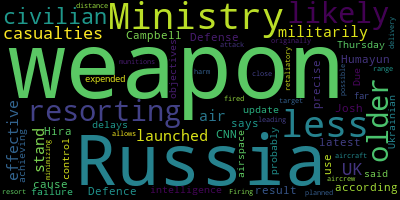
这篇文章主要在讲乌俄战争的事,出现最多次的为 weapon 和 Russia 这两个字,所以可以看出文字云中这两个字的字型最大
增加 Mask:英文
但一般的需求都是会有张底图,所以先去网路捉了张底图,根据官网做了些修改,测试程式如下
from wordcloud import WordCloud, STOPWORDS
import numpy as np
import matplotlib.pyplot as plt
from PIL import Image

# Read the whole text.
txtfile = "c:/test-wordcloud/cnn.txt"  # 刚才下载存的文字档
pngfile = "c:/test-wordcloud/cloud.jpg"  # 刚才下载存的底图
text = open(txtfile,"r",encoding="utf-8").read()
alice_mask = np.array(Image.open(pngfile))

# Generate a word cloud image
wordcloud = WordCloud(background_color="white", mask=alice_mask, contour_width=3, contour_color='steelblue').generate(text)

# 绘图
plt.figure()
plt.imshow(wordcloud, interpolation="bilinear")
plt.axis("off")
plt.show()
其实主要只差了这一行,多加几个参数而已
wordcloud = WordCloud(background_color="white", mask=alice_mask, contour_width=3, contour_color='steelblue').generate(text)
产生文字云如下
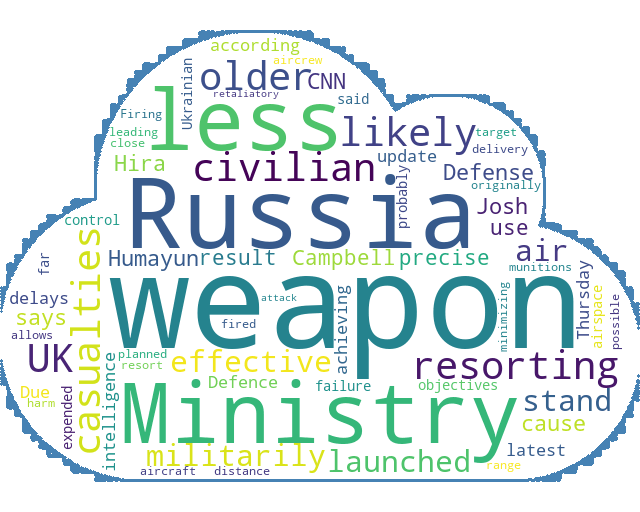
这张图看起来就符合需求多了,但是这个程式码只适用于英文,原因是中文有断词问题
中文断词套件:Jieba
中文断词套件最有名的就是 Jieba
这篇文章不打算仔细的介绍 Jieba 的原理,有空的话再整理篇独立的文章吧
先简单介绍使用 Jieba 产生中文文档文字云,需要的档案
字典档
非必须, Jieba 预设用的是简体中文,如果要使用繁体中文的话,建议先去下载繁中的字典档,断词效果会较好
stopwords
stopwords 指的是不希望被断词的字,像英文的「the」,中文的「的」之类的,这个档可以自行编辑,但我习惯直接拿别人写好的,
stopwords 下载点(非官方) 下载连结
字型档
产生中文文字云需要有中文字型,在一般 windows 的电脑都已经内建有中文字型了,只需要将路径指向就可以,以 windows 10 来说,目录在 c:\Windows\Fonts 下
中文文档文字云
这次测试的文档是 【股票市场多少是合理的投资报酬率?实测美股大盘28年】
完整程式码如下
from wordcloud import WordCloud, STOPWORDS
import numpy as np
import matplotlib.pyplot as plt
from PIL import Image
import jieba
import jieba.analyse
from collections import Counter # 次数统计

dictfile = "c:/test-wordcloud/dict.txt"  # 字典档
stopfile = "c:/test-wordcloud/stopwords.txt"  # stopwords
fontpath = "c:/test-wordcloud/msjh.ttc"  # 字型档

mdfile = "c:/test-wordcloud/reasonable-stock-return-spy.mdx"  # 文档
pngfile = "c:/test-wordcloud/cloud.jpg"  # 刚才下载存的底图

alice_mask = np.array(Image.open(pngfile))

jieba.set_dictionary(dictfile)
jieba.analyse.set_stop_words(stopfile)

text = open(mdfile,"r",encoding="utf-8").read()

tags = jieba.analyse.extract_tags(text, topK=25)

seg_list = jieba.lcut(text, cut_all=False)
dictionary = Counter(seg_list)

freq = {}
for ele in dictionary:
    if ele in tags:
        freq[ele] = dictionary[ele]
print(freq) # 计算出现的次数

wordcloud = WordCloud(background_color="white", mask=alice_mask, contour_width=3, contour_color='steelblue', font_path= fontpath).generate_from_frequencies(freq)
plt.figure()
plt.imshow(wordcloud, interpolation="bilinear")
plt.axis("off")
plt.show()
程式应该不难懂,大概要知道的就是 freq 是去计算每个词出现的次数,依出现次数多少来决定字体大小,然后参数 topK=25 是取前 25 个值
产生的文字云就是文章开头那张,符合需求,任务完成
